Check credit usage
Review your remaining credits and usage history.
Updated: September 2026
Workshop guide: Current screens and step-by-step practice.
Check the credits currently available under Remaining credits in the sidebar. Comparing the balance and usage history before and after a task makes usage easier to understand.
Check the remaining balance
- Sign in and review Remaining credits near the bottom of the sidebar.
- If you need more detail, open the available usage view from that area.
- Review the period and usage items, then compare them with the tasks you ran.
Manage usage
Before starting a large document or several creation tasks, check the remaining balance. Review it again after completion to understand which feature used credits.
If the history differs from what you expected, note the task time and feature, then request help through 1:1 support.
Check the actual screen
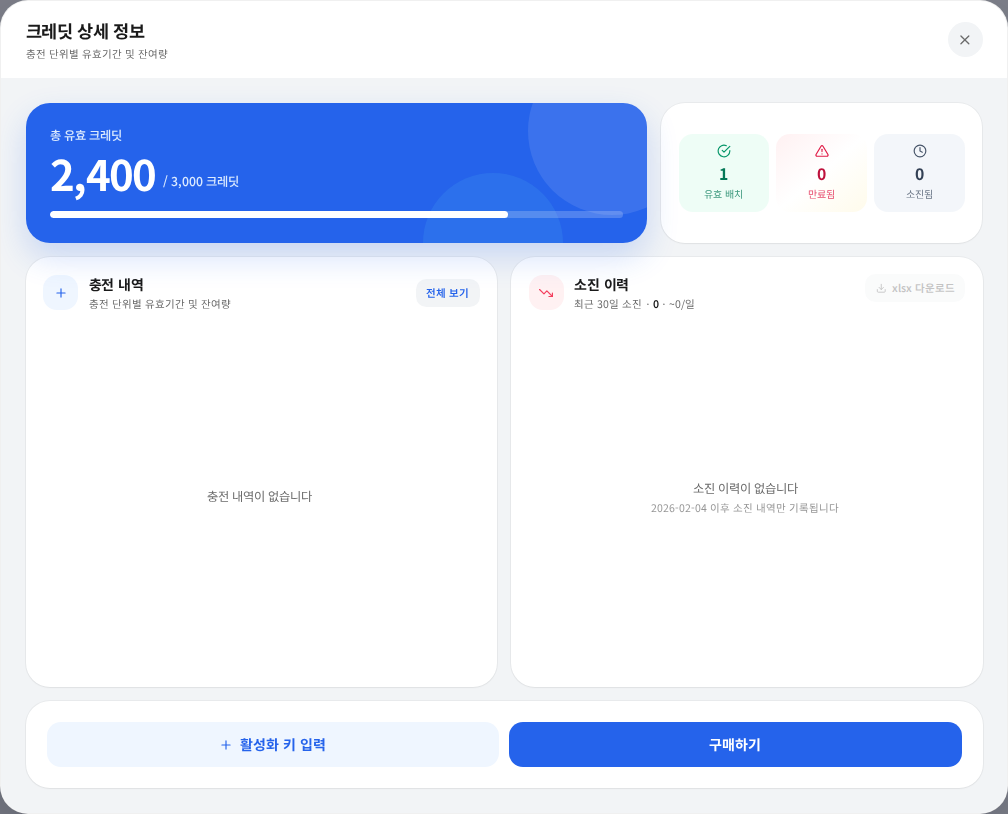
Actual Korean interface with sample credit amounts.
Open Credit balance at the lower left, distinguish valid balance, additions, and deductions, and check task type and time. Organization and personal limits may differ. For an unexpected entry, report the time, feature, and error if any.
Was this answer helpful?