Review group usage and operate credit budgets
Connect group-manager oversight with the master dashboard, period filters and exports.
Updated: September 2026
Screens show real UI components with fictional training names, emails and values. No accounts were changed and no emails were sent. Select an image to open it at full size.
Understand visibility by role
Group managers use Group management for groups where they hold manager rights. The master manages the organization-wide dashboard and policy. If a group is missing, check the login email and role assignment before creating another account.
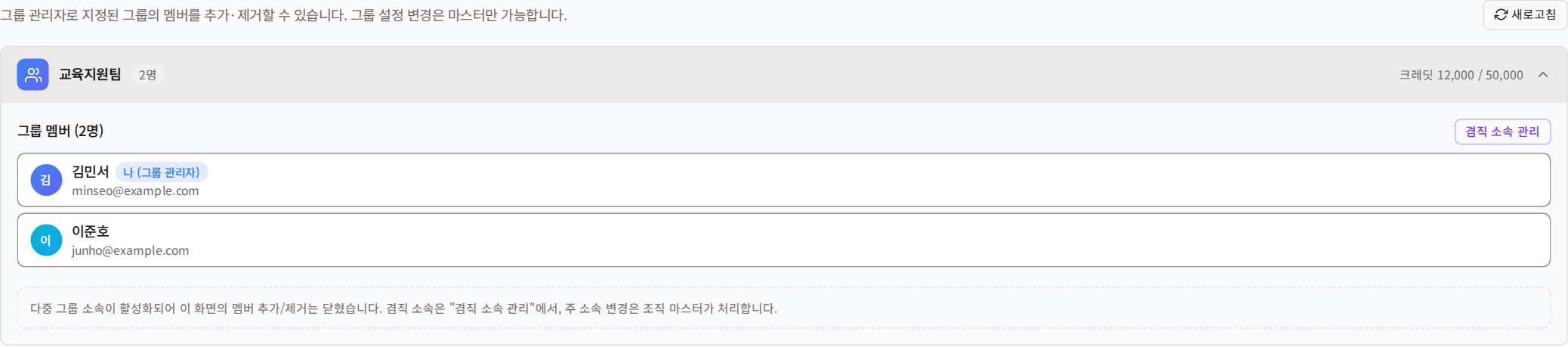
1. Read shared and isolated credit policies
| Policy | Budget behavior | When access is blocked |
|---|---|---|
| Shared | Members share the group budget | Check group balance and allowed models |
| Isolated | Members receive allocations within the group budget | Check group balance and personal allocation/usage |
The active group can determine the budget used by a multi-group member. Secondary membership does not duplicate credits or automatically top them up. See organization and group credit management.
2. Masters open group usage
Open Account menu → Admin dashboard → Usage by group. Select the start and end dates, then expand a group to inspect member usage and request counts.
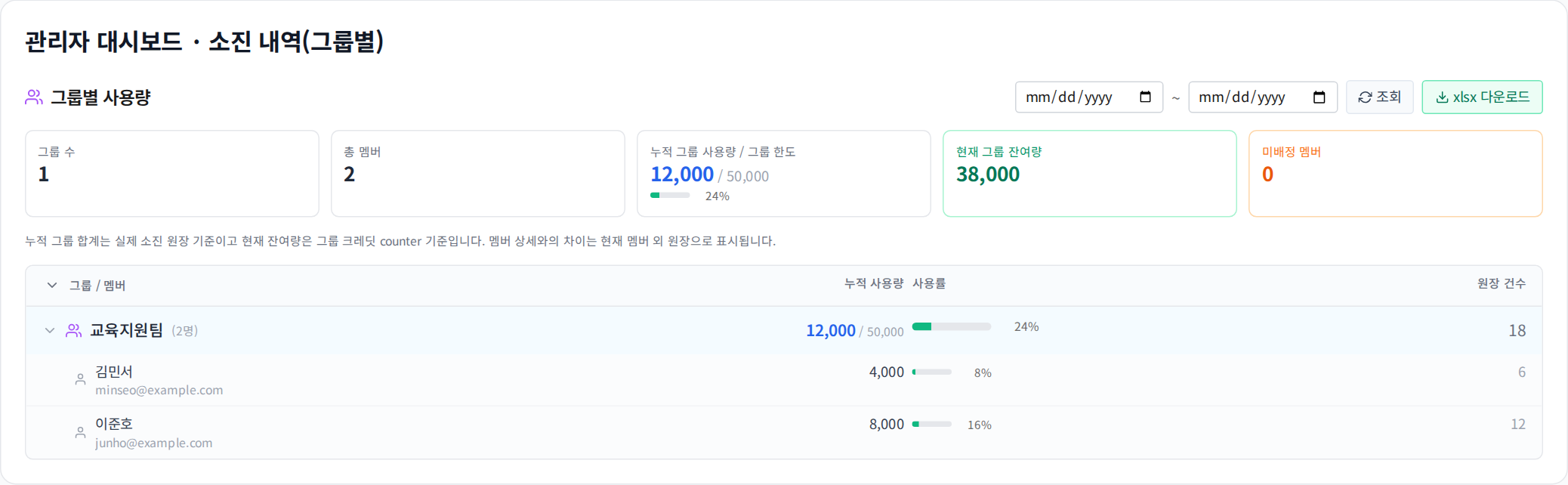
These values are fictional training data, not customer activity or institutional results.
3. Compare like-for-like figures
Current remaining credits and usage during the selected period have different reference points. Historical usage remains after transfers, secondary-assignment changes and deactivation. Do not reconstruct past usage solely from today's roster.
In an Excel export, do not sum group subtotals and member detail rows together: that may count the same usage twice. Check the subtotal scope and any usage not attributed to individual members.
4. Turn observations into support actions
| Observation | Ask | Next action |
|---|---|---|
| Almost no usage | Are login, membership or permissions blocking access? | Walk through login and a first prompt |
| One member's usage increased | Long context, attachments or advanced models? | Explain estimates and context controls |
| Low group balance | Are period, current work and allocation correct? | Discuss budget allocation with the master |
| Multi-group usage question | Which group was active at the time? | Review period usage and historical attribution |
Usage alone does not establish answer quality or work outcomes. Collect the relevant time and a minimal error example for quality reports.
5. Review requests and check weekly
Where enabled, use the request inbox. Confirm account, group and requested change before approval. Each week, review new-user access, unused accounts needing support, remaining budget, ending secondary roles and pending requests.
Completion check: Query the same date range for comparison and explain the difference between current balance and period usage.
Was this answer helpful?