Using Standard Korean Dictionary
Distinguish similar words in a report
Updated: October 2026
Distinguish similar words in a report with Standard Korean Dictionary. Retrieve relevant information and keep its source and reference date together.
A practical use case
Distinguish similar words in a report. Check homonym identifiers, parts of speech, sense numbers and available examples.
1. Open MCP connectors in the composer
Sign in to MonoGPT chat and open MCP connectors below the message input. An enabled button may display MCP Auto or a selected count such as MCP 1. Identify it by its name among the other composer tools.

2. Connect and select it for this conversation
- Find the Standard Korean Dictionary card shown in the screenshot below. Catalog labels currently appear in Korean; match the logo and card name in the image, or search using that displayed name.
- Open Connect, read the external data notice, give consent and connect. Skip this step if already connected.
- Turn on Use connectors in this conversation at the top.
- Choose Manual selection and check the Standard Korean Dictionary card. Confirm that its name appears above the results.
- Close the panel and enter the sample prompt below.
Credentials required means this connection is not ready yet. Follow these steps after operational setup is complete. The image shows the waiting state, not a successful query.
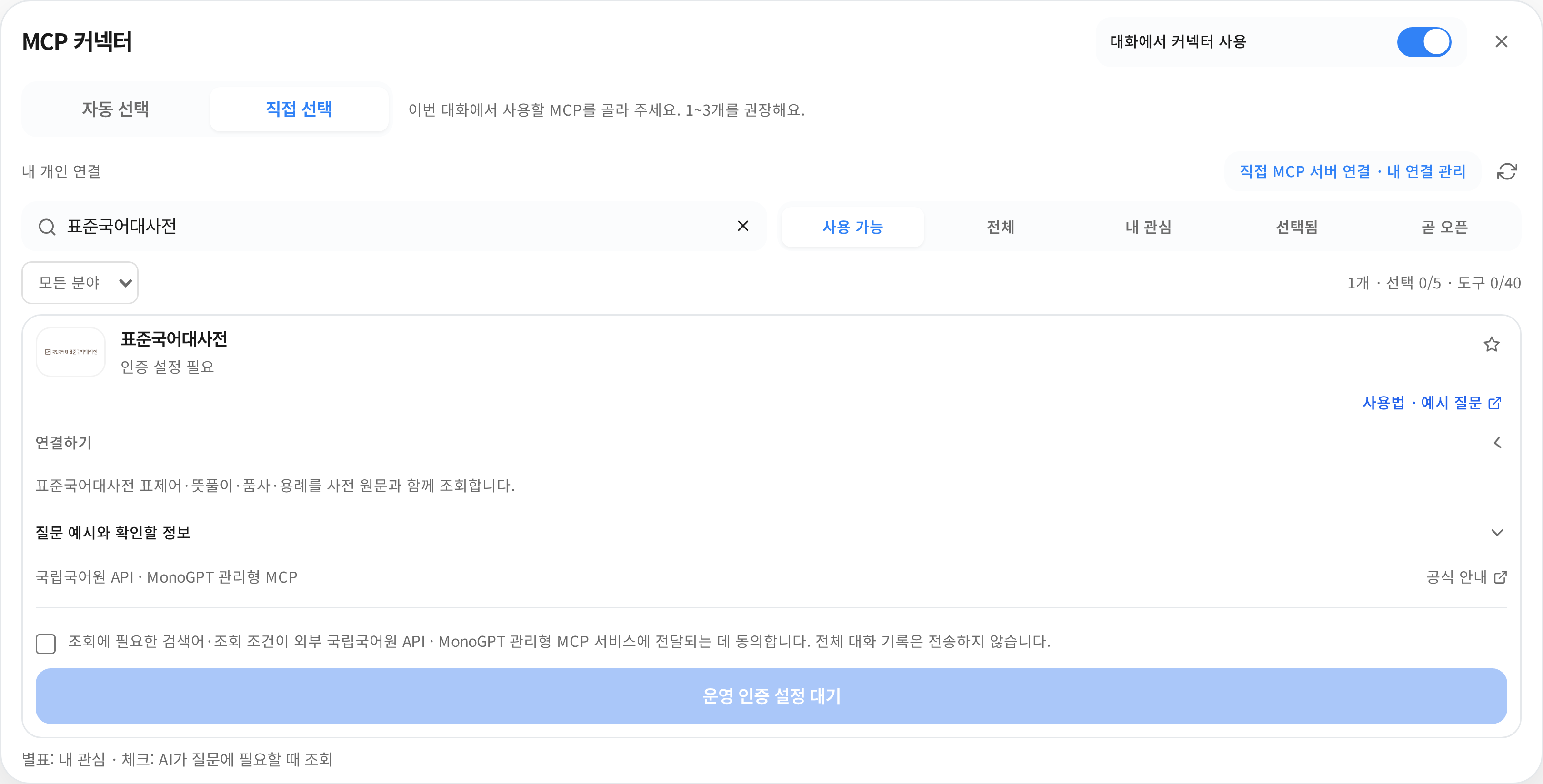
The actual application connector picker, captured at 3x resolution. Connection and selection states are demonstrations, not a real account installation or conversation result. The interface is shown in Korean. Click an image to open it at its original size.
3. Try this prompt
Compare the Standard Korean Dictionary entries for sanrim and samrim, including parts of speech, definitions, examples and source links.
This is a sample question, not a retrieved result. Answers depend on the query date and available data. Adapt the subject and period to your work.
Check the answer
- Check homonym identifiers, parts of speech, sense numbers and available examples.
- Inspect the tool activity above the answer to see whether a lookup actually ran.
- Open the source and check values and dates. Ask the assistant to distinguish missing information from the scope it searched.
Available after operational credentials are configured. Do not treat invented examples as dictionary examples; keep the headword and sense number together.
If a lookup fails, check the connection, conversation switch, manual selection and supported model in that order. Being connected and enabling use in a conversation are separate settings.
Was this answer helpful?