Using CRIS Research
Look up studies registered in Korea
Updated: October 2026
Look up studies registered in Korea with CRIS Research. Retrieve relevant information and keep its source and reference date together.
A practical use case
Look up studies registered in Korea. Match the study title with the registration number.
1. Open MCP connectors in the composer
Sign in to MonoGPT chat and open MCP connectors below the message input. An enabled button may display MCP Auto or a selected count such as MCP 1. Identify it by its name among the other composer tools.

2. Connect and select it for this conversation
- Turn on Use connectors in chat at the top of the panel.
- Find the CRIS Research card shown in the screenshot below. Catalog labels currently appear in Korean; match the logo and card name in the image, or search using that displayed name.
- Open Connect, read the external data notice, give consent and connect. Skip this step if already connected.
- Choose Manual selection and check the CRIS Research card. Confirm that its name appears above the results.
- Close the panel and enter the sample prompt below.
Credentials required means this connection is not ready yet. Follow these steps after operational setup is complete. The image shows the waiting state, not a successful query.
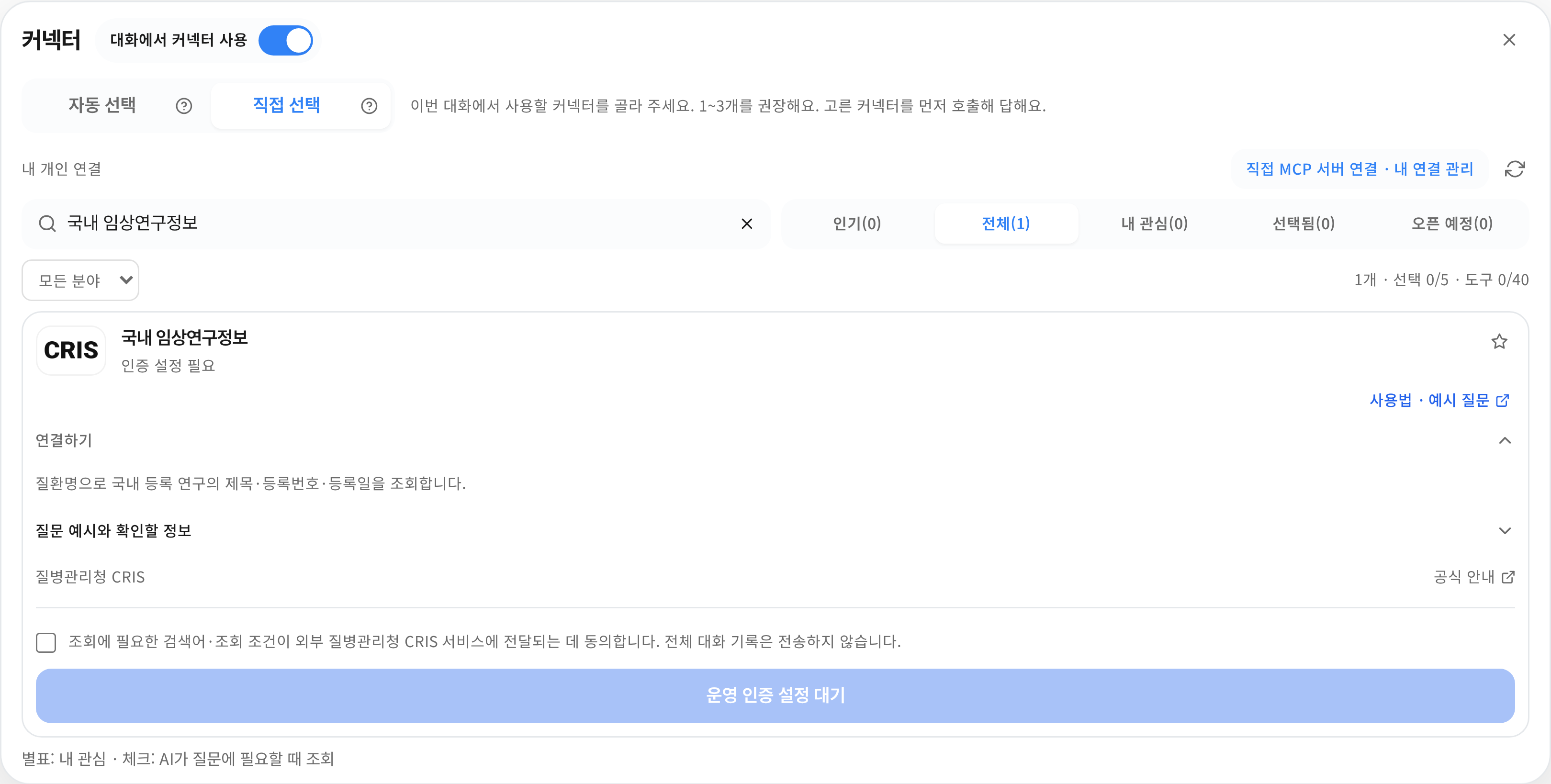
The actual application connector picker, captured at 3x resolution. Connection and selection states are demonstrations, not a real account installation or conversation result. The interface is shown in Korean. Click an image to open it at its original size.
3. Try this prompt
Find Korean clinical studies on diabetes, including registration numbers and titles.
This is a sample question, not a retrieved result. Answers depend on the query date and available data. Adapt the subject and period to your work.
Check the answer
- Match the study title with the registration number.
- Inspect the tool activity above the answer to see whether a lookup actually ran.
- Open the source and check values and dates. Ask the assistant to distinguish missing information from the scope it searched.
Use the registry date to identify the version of the record.
If a lookup fails, check the connection, conversation switch, manual selection and supported model in that order. Being connected and enabling use in a conversation are separate settings.
Was this answer helpful?