Find and use discounted models
Check the discount and end date in the model selector, then select the intended model.
Updated: September 2026
Screens show real UI components with fictional training names, emails and values. No accounts were changed and no emails were sent. Select an image to open it at full size.
1. Open the model selector
Select the current model name at the top of chat. Switch to the full list if necessary. Clear any search term. The Limited-time discounts section appears when there are eligible visible promotions.
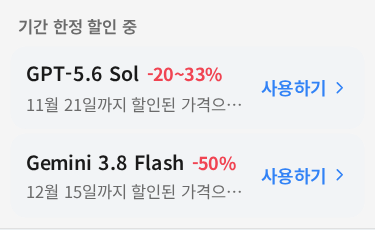
This is a capture-time example. Models, discounts and end dates may change; use the current selector's information on the day of use.
2. Read three details before selecting
- Check the model name and whether it suits the task.
- Read the discount and end date. Standard pricing may return after the promotion.
- Select Use and verify the model name at the top. Review any model-transition dialog before proceeding.
3. Distinguish discounts from total usage
A badge describes the model's price promotion. It does not guarantee every answer's total credit charge will fall by that exact percentage. Input/output volume, reasoning, search and tools can vary. After directly selecting the model, review estimated credits, then actual usage after completion.
4. Choose between a promotion and smart routing
| Goal | Choice |
|---|---|
| Use a particular discounted model | Select it directly from its card |
| Automatically select a model for the task | Choose Auto or Premium |
| Prioritize a demanding review | Start with Premium and verify the result |
Auto/Premium do not always select the cheapest or a discounted model. Select directly when using that specific model matters.
Troubleshooting
Clear search and check the full list. Expired promotions, account/organization model access and model availability may remove a card. Ask your administrator about access rather than creating a different account.
Completion check: Locate the model name, discount and end date, then verify the actually selected model at the top.
Was this answer helpful?