Smarter routing: practice with Auto and Premium
Start routine work with Auto and demanding reviews with Premium; guide selection through clear task intent.
Updated: September 2026
Screens show real UI components with fictional training names, emails and values. No accounts were changed and no emails were sent. Select an image to open it at full size.
Choose Auto or Premium for the task
| Mode | Good starting tasks | Remember |
|---|---|---|
| Smart Routing (Auto) | Email drafts, summaries, translation and routine questions | Selects for task and difficulty; not a lowest-price guarantee |
| Smart Routing (Premium) | Complex comparisons, important document reviews and multi-step problems | Prioritizes higher-tier models for the task; may use more time and credits |
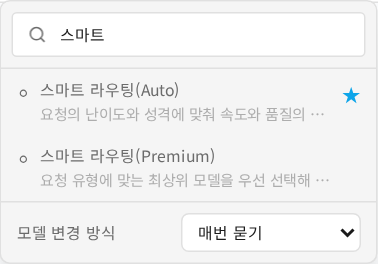
What has become smarter?
Routing now has stronger task-intent and category selection. It assesses task type, difficulty, reasoning needs and current-information search needs rather than relying only on a single word. Premium has also been updated to prioritize recent higher-tier models by task category.
Writing, translation and creative work can take a different path from coding, analysis or mathematics. Search-dependent requests consider search-capable paths. Actual selection depends on permitted models, input/tool requirements, search settings and availability.
“Smarter” describes these selection improvements. It is not a guarantee of perfect accuracy or a measured percentage improvement for every answer. Verify important outputs against sources.
1. Start routine work with Auto
Select Smart Routing (Auto) at the top and state the task, audience and format.
“Using only these meeting notes, provide a five-line manager summary and an action-item table. Mark missing owners and deadlines as needing confirmation.”
Follow up with requests such as sorting tasks by priority. Start a new conversation when the purpose changes substantially.
2. Use Premium for demanding reviews
Select Smart Routing (Premium). Provide evaluation criteria and constraints.
“Compare attached training plans A and B by budget, staffing, participant convenience and operational risk. Identify missing information first, tabulate only supported differences, then explain a recommendation and its conditions. Do not invent figures.”
Use it for competing criteria, document logic and important reviews. Inspect missing information, assumptions and recommendation conditions, not just the conclusion.
3. Check current information and source boundaries
For changing policies, schedules or prices, request an as-of date and sources. Check search settings where needed. Confirm that private documents finished uploading; choosing routing does not automatically connect private sources.
4. Check cost and promotions
Auto/Premium may show Estimated credits: after model selection because the execution model is chosen later. Read the estimate guide. To use a specific discounted model, select it directly from its promotion card.
5. Compare modes during the workshop
Use the same public or fictional material and request for both modes. Compare omissions, evidence, structure and numerical errors using the same criteria, and inspect actual credit usage. A single example does not establish universal superiority. Try Auto for routine work and Premium for important multi-criteria reviews.
Troubleshooting
| Symptom | Next action |
|---|---|
| Mode missing or unavailable | Check model permissions for the account and active group |
| Vague response | Add source scope, criteria and output format |
| Current information unverified | Check search settings, date and actual sources |
| A specific model/tool is necessary | Select the model directly and verify tool support |
Completion check: Choose a task from your work and explain the mode choice and how you will verify the result.
Was this answer helpful?