Read enterprise credit balances and usage
Compare company, team, group, and member balances with current-month and cumulative usage without confusing limits, allocations, and spending.
Updated: September 2026
Use Enterprise Organization Management > Credit usage status to see current allocations, remaining credits, and recorded usage by company, team, group, and member. This is a read-only view: searching, expanding rows, and refreshing do not change balances.
Permissions: Administrators with organization-wide viewing permission see the organization's authorized scope. Group managers see only their permitted groups. Check Organization-wide view or Managed groups only at the top. Viewing permission does not itself grant permission to change credit allocations, and an accounting assignment alone does not grant organization-wide credit management.
Version and screenshots: This guide describes v7.1925, checked on September 21, 2026. The screenshot shows the Korean interface with fictional Hanbit Group data. English labels below describe the corresponding controls; labels and access can vary with language, organization settings, and permissions.
Understand the credit amounts
Organization funds, group limits, and member balances
Organization credits are the funds available for the organization to use. Allocating credits to a group or member does not create additional organization funds. Amounts already committed to another group or needed for an in-progress request may not be available for a new allocation. When allocating credits, check Available for this selection in the preview.
Current allocation limit includes credits already used against that limit. For example, a current limit of 30,000 with 10,000 already used leaves 20,000 remaining. It does not mean that the member receives 30,000 every month.
This month's usage is actual recorded usage during the current month in Korean Standard Time. Cumulative usage covers the available historical usage records for the group. Changing an allocation limit or balance is not counted as new spending. Refunds reduce usage, so a period with substantial refunds can have a negative usage value.
The usage columns and the current allocation limit have different purposes.
Shared and isolated spending
| Spending mode | How credits are used | What an administrator should know |
|---|---|---|
| Shared | Members use one group balance together. | There is no separate personal balance to reclaim. Personal limit and balance cells display Shared group balance. |
| Isolated | Each member uses their own assigned balance. | A member with no personal allocation cannot use the group's credits even when the group has a remaining balance. Individual allocation, recovery, and transfer are available. |
Example: A group has 100,000 remaining, but Haneul Kim has a personal allocation of zero. In isolated mode, Haneul cannot spend those group credits until an allocation is made. Assign credits from the group's unallocated pool or transfer unused credits from another member.
A department in the organization chart and a financial group are not always the same unit. Several departments may share one operational group. When that warning appears, allocation applies to the actual group. Ask the organization administrator to check group and membership connections before trying to run separate budgets for each department.
Read Credit usage status
- Open Enterprise Organization Management > Credit usage status.
- Check Organization-wide view or Managed groups only, along with the timestamp shown at the top.
- Expand the company, team, group, and member hierarchy. Use Expand all, Collapse all, or the arrow beside an individual row.
- Enter a term in Search companies, teams, names, or emails. Matching paths expand while searching. Clear the term to return to the full structure.
- Select Refresh to check recent allocations or usage.
| Field or label | Meaning |
|---|---|
| Remaining credits in viewed groups | The combined remaining balance of the groups within your viewing scope. |
| This month's usage | Recorded usage during the current month, using Korean Standard Time. |
| Cumulative usage | All available historical usage recorded for the group. |
| Current allocation limit | The current limit, including amounts already used against it. It is not the monthly award. |
| Remaining credits | The balance left after usage against the current limit. |
| Additional membership | The group is an additional membership rather than this person's primary group. |
| Unallocated | An isolated member's allocation limit is zero, or the person is not assigned to a group. |
| Fully used | An allocation limit exists, but its remaining balance is zero. |
| An em dash | There is no applicable value to aggregate in that cell. It does not mean zero. |
Search helps you find rows. The summary cards and group totals do not become totals for only the matching members. The search result's membership count counts group memberships, so it may differ from the number of unique people when additional memberships exist.
The view shows active companies, teams, groups, and members, including empty teams. Groups not connected to the organization chart, Groups connected to multiple companies, and Members without a group appear in separate sections when relevant. A group connected to several teams is counted only once.
Group usage also includes records from former members. Adding the amounts shown for current members may therefore produce a different number from the group's total. Usage for members who have no group is outside this table's aggregation scope. On a small screen, scroll the table horizontally to see the amount columns on the right.
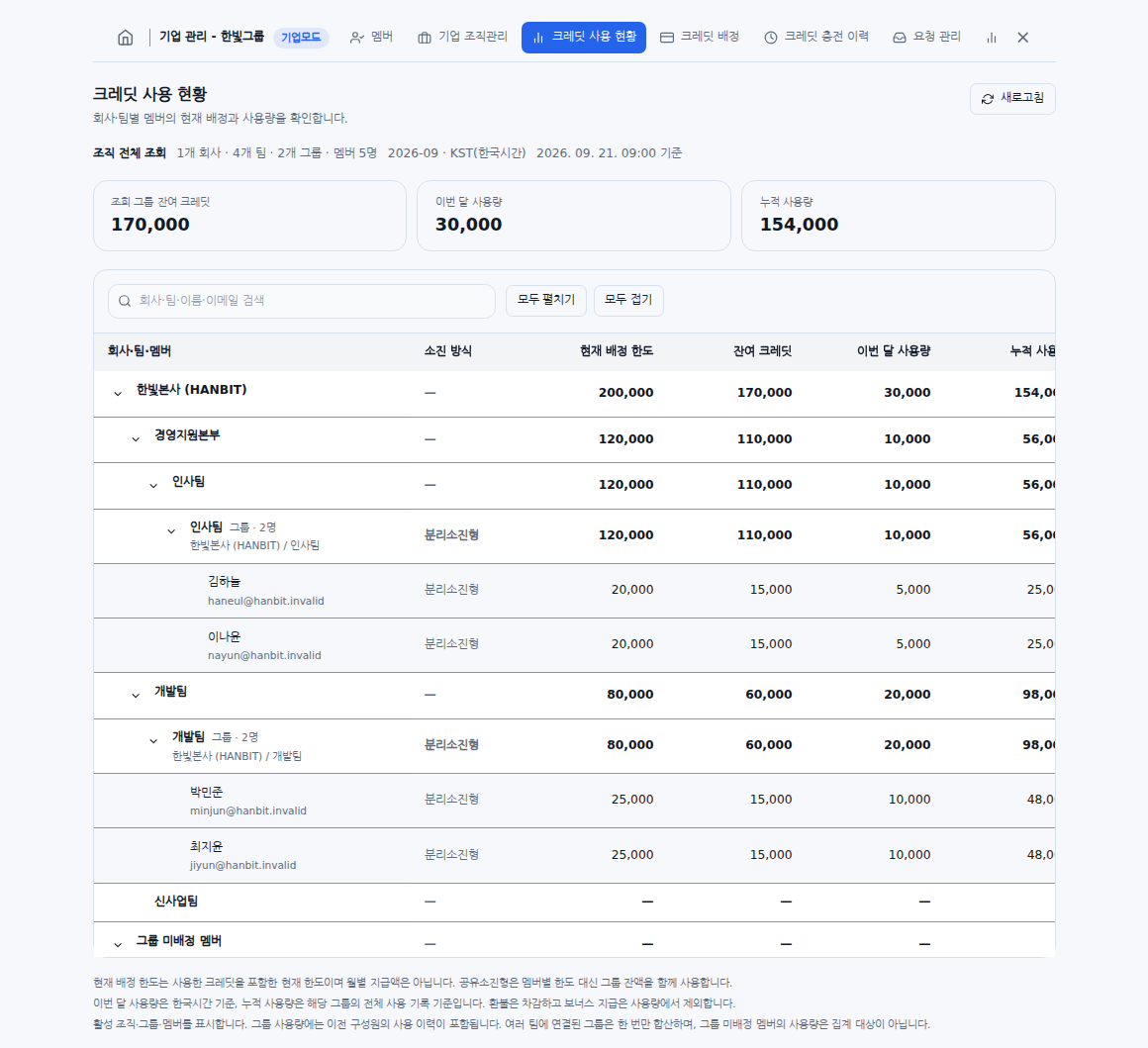
Korean interface with sample data. Current allocation limits, this month's usage, and cumulative usage are different measures. Check unallocated entries as well as available balances.
Why Credit usage status and Usage can differ
- Credit usage status uses current active groups and shows current member allocations alongside usage recorded for those groups. Bonus-credit awards are excluded from its usage figures.
- Usage aggregates deduction events for the selected period by company, department, or member. It includes free, bonus, and refund events, using current assignments for active members and retained historical assignments for deleted members.
- Scope, attribution, and included records can differ between the screens. Check the viewing scope and period before comparing their totals. Neither screen's usage total should be treated as the other screen's remaining balance.
- Credit top-up history is a separate menu for credits added to the organization and their recharge records. It is not the member usage table or the monthly member-allocation history.
If a value or menu is unavailable
Check the signed-in account's organization and role, the feature's activation state, and the company or group scope granted to you. A loading or permission error does not mean the balance is zero. Use Retry or Refresh if offered. If access remains unavailable, send support the menu path, complete message, time, and affected company, department, or group.
Was this answer helpful?